Read model data
Model output can be accessed and read using the model_module. The model_module config file model_cfg.yaml needs adjustments if you want to include a model that is not present as default. Given that the model output file you would like to read follows the cf-conventions and standard_names are unique, the minimum information you have to provide are usually the following as illustrated with the WAVEWATCH III example:
ww3_4km:
    name: ww3_4km
    download:
    wavy_input:
        src_tmplt: "https://thredds.met.no/thredds/dodsC/\
                    ww3_4km_archive_files/%Y/%m/%d/"
    fl_tmplt: ww3_4km_%Y%m%dT%HZ.nc
    reader: read_ww3_4km
    collector:
    vardef:
        Hs: hs
        time: time
        lons: longitude
        lats: latitude
    coords:
    misc:
        init_times: [0,6,12,18]
        init_step: 6
        grid_date: 2021-11-16 00:00:00
        date_incr_unit: h
        date_incr: 1
    tags:
Various predefined functions to aid reading the model output files are implemented. Those are called reader and have to be defined as in the example above for the operational WAVEWATCH_III model (reader: read_ww3_4km). The following readers are implemented so far:
read_ww3_4km (for non-regular lat/lon, common for other projections than lat/lon)
read_meps
read_field
read_ecwam
read_ww3_unstructured_to_grid (made for our unstructured NORAC WW3 hindcast)
read_era (seems to work for many regular lat/lon grids)
read_era5 (like read_era but more memory efficient)
read_NORA3_wind
Please try them out and see if any of those work for you. If not, let us know so we can help.
Often there are ambiguities due to the multiple usage of standard_names. Any such problem can be solved here in the config-file by adding the specified variable names under vardef. Examples are given in the default model_cfg.yaml file. The variable aliases (left hand side) need to be specified in the variable_def.yaml. Basic variables are already defined. All specs listed here are also used when wavy writes the retrieved values to netcdf.
Another important section is misc. The init_times define all times when the model is initialized whereas the init_step defines the time between the initializations. These are useful to pick the desired leadtimes. For continuous simulations (like hindcasts or reanalysis) init_times can be set to [0] and init_step to 24. The grid_date is useful when the model domain should be used as a region for which you like to retrieve satellite data. Then the grid_date just specifies a date for which you know a model files exists such that the lat/lon grid can be extracted for defining the model domain. date_incr defines the time steps in the model output and date_incr_unit defines the unit. In the example above the model output is hourly.
>>> from wavy.model_module import model_class as mc
>>> nID = 'ww3_4km' # default
>>> varalias = 'Hs' # default
>>> sd = "2023-6-1"
>>> ed = "2023-6-1 01"
>>> mco = mc(nID=nID, sd=sd).populate() # one time slice
>>> mco_p = mc(nID=nID, sd=sd, ed=ed).populate() # time period
Whenever the keyword “leadtime” is None, a best estimate is assumed and retrieved. The output will be something like:
>>> mco = mc(nID=nID, sd=sd)

>>> mco.
mco.cfg                mco.filter             mco.meta               mco.quick_anim(        mco.stdvarname
mco.coords             mco.get_item_child(    mco.model              mco.quicklook(         mco.units
mco.crop_to_period(    mco.get_item_parent(   mco.nID                mco.reader(            mco.varalias
mco.distlim            mco.leadtime           mco.pathlst            mco.region             mco.varname
mco.ed                 mco.list_input_files(  mco.populate(          mco.sd                 mco.vars

>>> mco.vars.keys()
KeysView(<xarray.Dataset>
Dimensions:  (time: 1, rlat: 1026, rlon: 624)
Coordinates:
  * rlat     (rlat) float64 -14.35 -14.31 -14.27 -14.23 ... 26.57 26.61 26.65
  * rlon     (rlon) float64 5.53 5.57 5.61 5.65 5.69 ... 30.33 30.37 30.41 30.45
  * time     (time) datetime64[ns] 2023-06-01
Data variables:
    Hs       (time, rlat, rlon) float32 1.183 1.183 1.183 1.182 ... nan nan nan
    lons     (time, rlat, rlon) float32 -31.02 -30.96 -30.9 ... 65.7 65.7 65.69
    lats     (time, rlat, rlon) float32 53.25 53.24 53.24 ... 62.01 61.97 61.94
Attributes: (12/38)
    WAVEWATCH_III_version_number:    6.07
    WAVEWATCH_III_switches:          F90 NOGRB NOPA LRB4 NC4 TRKNC DIST MPI P...
    product_name:                    4km operational wave model forecast product
    area:                            4km operational domain covering: Nordic ...
    date_created:                    2023-06-01T03:19:09Z
    title:                           ww3_4km / operational wave forecast MET ...
    ...                              ...
    time_coverage_end:               2023-06-03T18:00:00Z
    Conventions:                     CF-1.6, ACDD-1.3
    NCO:                             netCDF Operators version 5.0.6 (Homepage...
    history:                         Thu Jun  1 03:19:27 2023: ncatted -O -a ...
    Forcing:                         cat: tmp.txt: No such file or directory\n
    DODS_EXTRA.Unlimited_Dimension:  time)
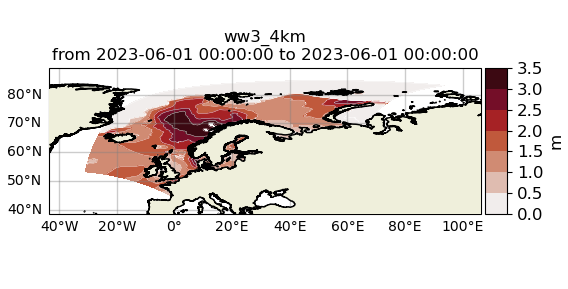
For the modelclass objects a quicklook fct exists to depict a certain time step of what you loaded:
>>> mco.quicklook(m=True) # for a map
Note
Even though it is possible to access a time period, wavy is not yet optimized to do so and the process will be slow. The reason, being the ambiguous use of lead times, will be improved in future versions.